-1600x900.webp&w=3840&q=75)
Key takeaways
- The right payroll provider will prevent mistakes before any money gets moved, will file all your taxes, and won't be the one you're out the door with at the next stage of growth.
- Look past the headline price. It's the base fees, the per-employee fees, and the add-ons (faster deposits, extra state filings, etc.) that ultimately determine what you're going to pay.
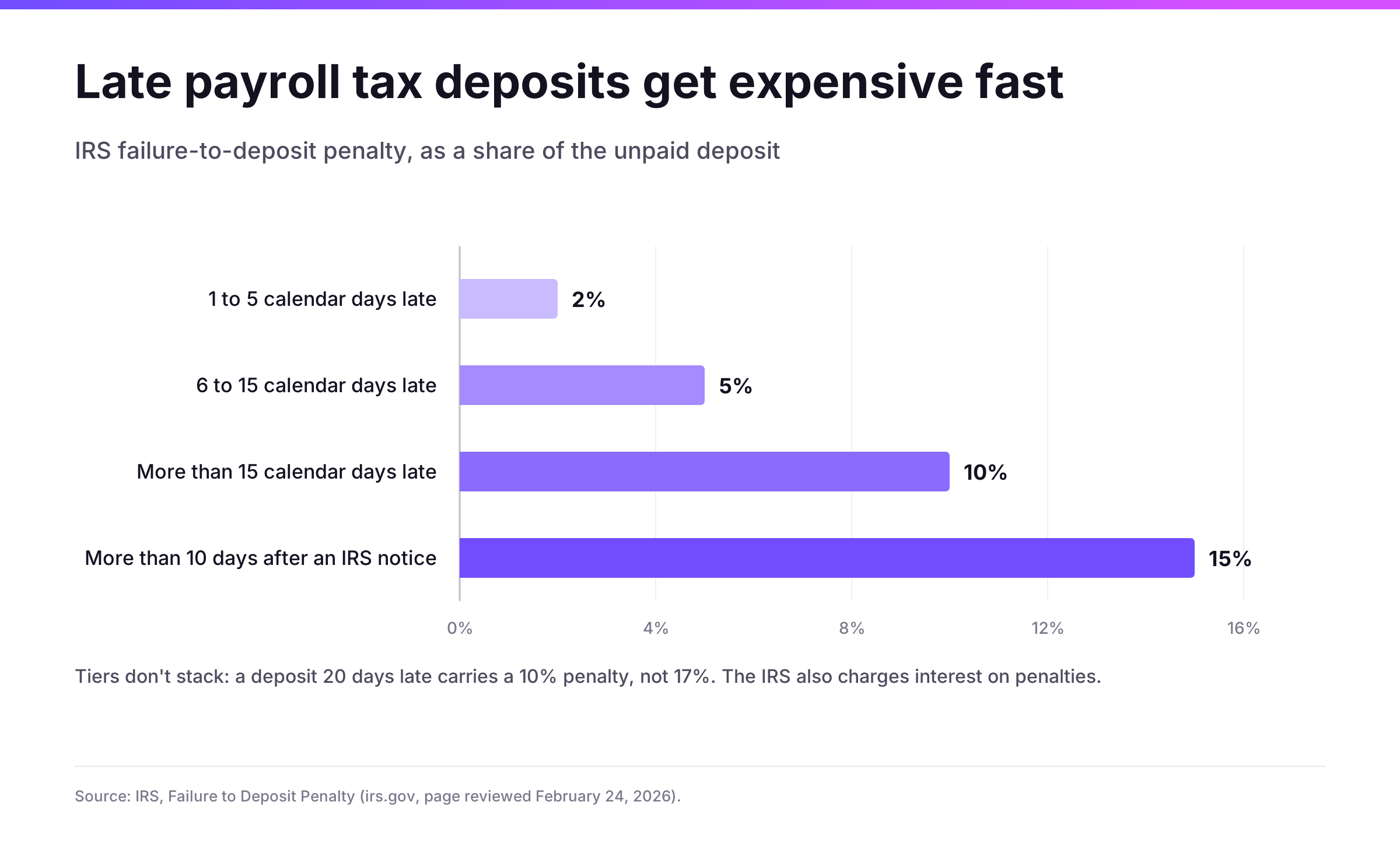
- A late payroll tax deposit can cost you 2% to 15% of the amount that's unpaid, so error prevention should be right at the top of your list.
Running payroll is simple enough until a state tax agency sends its first notice. Each paycheck will have federal withholding, Social Security and Medicare, state (and sometimes local) taxes, benefit deductions, and a deposit deadline. If you miss one of those deadlines, the cost comes out of the business.
This guide compares seven payroll services for small businesses worth shortlisting in 2027. The right one depends on how many states you pay in, whether you hire contractors or people abroad, and how much of the tax work you want to hand off.
What does a payroll service do?
A payroll service will calculate each employee's gross pay, withhold the correct taxes and deductions, and then pay the employee either by direct deposit or by check. The service will also deposit and file the payroll taxes with the federal, state, and local authorities. A full service provider will also issue the year-end forms (W-2s and 1099s).
There are two broad models:
- Payroll processing software that you run yourself. The software does the calculation of pay and tax, though on some plans you're still responsible for the actual deposit and filing of the taxes.
- Full-service payroll, where they calculate, pay, and file the taxes for you.
Most small business payroll software these days is in the middle ground, offering a mix of HR tools, benefits administration, time tracking, and contractor payments. The range of functionality is obviously a benefit, but it also means that two products with very similar marketing can end up being very different in terms of what they actually include and what they market as being an add-on.
What payroll mistakes cost a small business
Small business is a major part of the country's payroll. The SBA Office of Advocacy states that there are 36,207,130 small businesses in the US and that these pay 38.7% of the total private sector payroll. The same office notes that more than 80% of the paperwork burden faced by small businesses is from the IRS.
The penalties for getting the payroll taxes wrong go up very quickly. The IRS imposes a failure-to-deposit penalty which is based on how late the deposit is:
Errors within the payroll add their own cost. An EY survey found that 1 in 5 U.S. payrolls contains an error and that, on average, each error costs $291 to fix. Some categories are considerably more expensive:
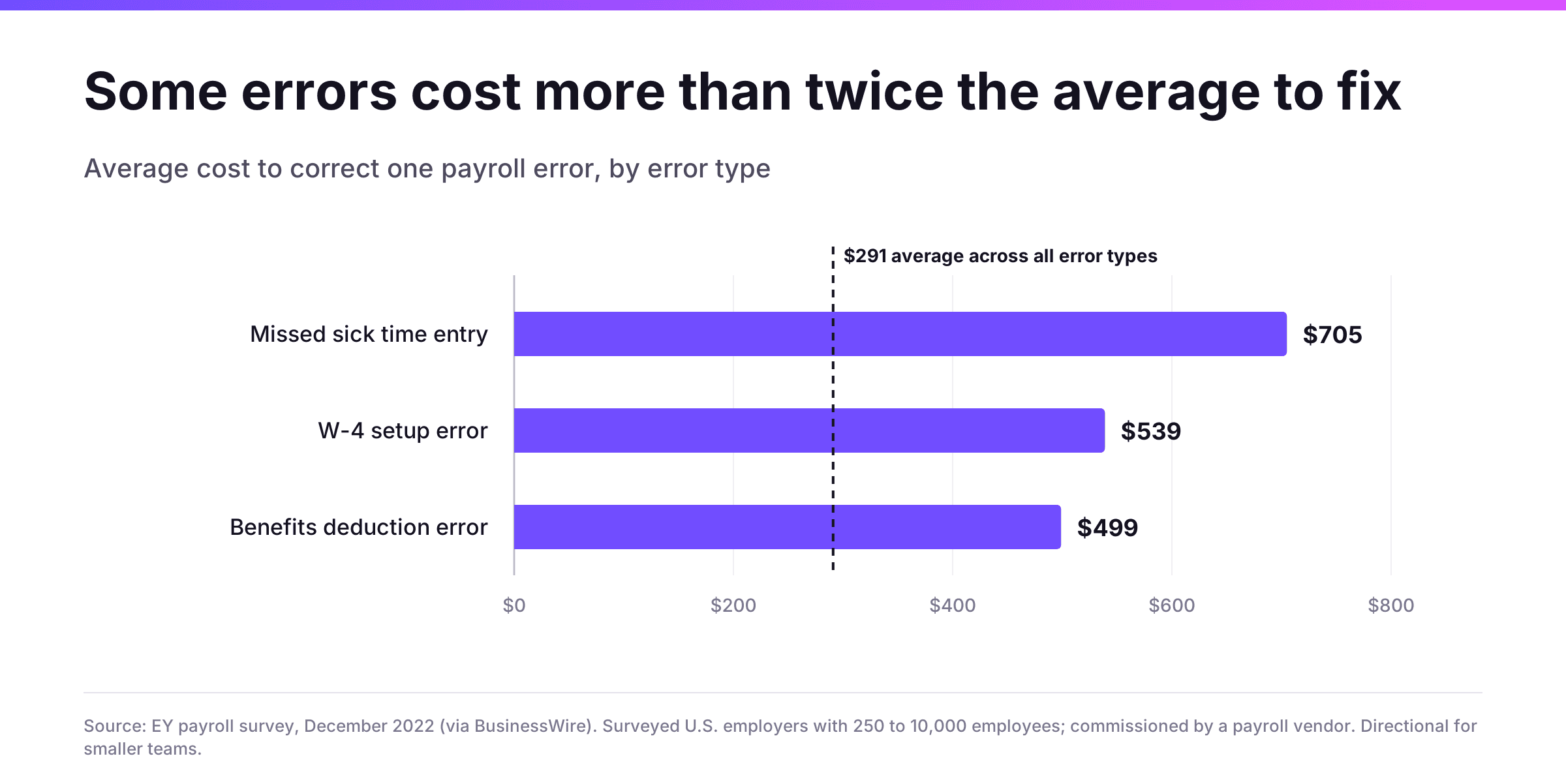
The cheapest subscription can still end up being the most expensive when you factor in the cost of corrections and penalties. A tool that picks up on a missing rate change or an incorrect withholding prior to payroll running will save you the cost of corrections, reduce employee frustration, and in some cases will even avoid the penalty.
Evaluating the best payroll software services for small businesses
- Error prevention prior to the run. Does the platform pick up on issues such as missing data, rate changes, or classification risk before any money actually moves?
- Tax and multi-state coverage. Does it calculate, deposit, and file federal, state, and local taxes, and can it manage employees in more than one state on the core plan?
- Pricing transparency. Is the pricing published? Are the features (faster deposits, extra states, etc.) included, or are they sold separately?
- Room to grow. Can the same system cope when you need contractors, benefits, PEO, or international hires?
- Support model. How do you get help and when?
We gave the most weight to the first and fourth criteria as those are the ones that determine how frequently payroll goes wrong and whether the provider is still a viable option after your next hire. Cost is important, but we didn't rank it on price alone.
The 7 best payroll providers at a glance
Provider | Best for | Multi-state payroll | Contractor payments | Standout |
Niural | Full business cycle | Included in core U.S. Payroll plan | Yes, U.S. and international | AI agent, EMMA, validates payroll before the run |
Gusto | First-time employers | Plus and Premium plans | Yes, U.S. and international | Simple setup, unlimited payroll runs |
QuickBooks Workforce | Businesses already on QuickBooks | Yes | Yes | Payroll AI and tax penalty protection on Elite |
ADP RUN | Owners who want an established provider | Yes, with updates for all 50 states | Yes | ADP Assist flags errors; 24/7 support |
Paychex Flex | Owners who want a dedicated specialist | Yes | Yes (U.S.) | Assigned payroll specialists available |
OnPay | Predictable, all-in pricing | Included at no extra cost | Yes (W-2 and 1099) | Benefits administration in the base plan |
Rippling | HR, IT, and payroll in one system | Yes | Yes, U.S. and global | Payroll synced with HR data |
1. Niural: best overall for growing businesses
Best for: Founders who want payroll that will catch issues before they arise and won't need replacing as the company adds on states, contractors, and countries.
Niural runs U.S. payroll on their proprietary tax engine with EMMA (their AI layer) embedded within the payroll workflow. EMMA validates the payroll prior to the run, identifies any missing rate changes, and flags any potential misclassification risk. Those errors are the most expensive to fix once the pay runs and the paychecks and tax deposits are all out. Businesses also earn payroll float on their balance in their wallet (their idle cash is earning them money), so Niural is the provider where payroll pays you back.
What stands out:
- Multi-state payroll, W-2s, 1099s, and unlimited pay schedules and runs in the core U.S. Payroll plan.
- Bonus, off-cycle, and reporting payrolls, plus wage garnishments and tax-exempt statuses
- Benefits administration, 401(k), and brokered health, dental, and vision.
- One system that extends to Niural PEO, contractor management, and an employer of record in 150+ countries
The employee records, the payroll history, and the controls you've set up on day one remain in place when you open a second state or when you hire your first person overseas.
Trade-offs: Niural is built for the company that's going to grow. A sole proprietor with one employee in one state is probably not going to be making much use of it.
2. Gusto: best for first-time employers
Best for: Small teams who are running their first payroll and want a guided, low-friction setup.
Every plan includes unlimited payroll runs, and Gusto will file your federal, state, and local payroll tax forms (including W-2s, 1099s, Form 940 and Form 941). It's a month-to-month arrangement with no long-term contract. Contractor payments can go to over 120 countries.
Trade-offs: the entry plan only runs payroll in one state; multi-state payroll is available from the Plus plan onwards. Same-day plus instant pay are add-ons on the lower tiers and are only included on the Premium plan.
3. QuickBooks Workforce: best for businesses already on QuickBooks
Best for: Those who already keep their books in QuickBooks Online and want payroll in the same place.
Intuit now sells its payroll plans as QuickBooks Workforce. All plans include full-service payroll, auto payroll for salaried employees, and 1099 e-filing. Payroll AI will collect the time data, look for anomalies, and draft the payroll for review. The base plan pays employees the following day. The Premium and Elite plans both offer same-day direct deposit. Elite adds expert setup and tax penalty protection, which will cover IRS penalties and interest up to $25k per year (subject to terms).
Trade-offs: the value is clearly strongest within the Intuit ecosystem. Time tracking and HR tools kick in on the Premium plan.
4. ADP RUN: best for owners who want an established provider
Best for: Businesses with 1 to 49 employees who want a well-established provider and 24/7 support.
RUN (powered by ADP) is available in four packages: Essential, Enhanced, Complete Payroll & HR+, and HR Pro. RUN handles the deduction and filing of federal, state, and local payroll taxes, and ADP Assist uses AI to flag errors before they occur.
Trade-offs: it's quote-based, so you'll need a sales conversation to compare pricing. The HR features scale up by package, so you'll need to establish which package contains what you require.
5. Paychex Flex: best for owners who want a dedicated specialist
Best for: Owners who would prefer to talk to a named individual rather than go through a help center.
Paychex automatically calculates, files, and pays payroll taxes (in every state where the employees work). Its Intelligent Pay Cycle will flag any issues prior to them causing a delay, and Paychex Pre-check allows employees to view their own paychecks prior to payroll running. There are three levels of support available: self-service, on-demand representatives, and dedicated assigned payroll specialists.
Trade-offs: it's quote-based. Paychex payroll is really designed for US employees and US contractors, so international hiring would be a separate discussion.
6. OnPay: best for predictable, all-in pricing
Best for: Small businesses who want to know precisely what they'll be paying without having to have a sales call.
OnPay publishes its pricing and has a lot in the base plan. Multi-state payroll is included at no extra cost, as are unlimited pay runs, unlimited W-2s and 1099s, year-end filings, benefits administration, free migration of prior wage data, and an accuracy guarantee.
Trade-offs: HR tools, time tracking, compliance resources, and live HR support are all separate add-ons. Phone and chat support is on extended weekday hours rather than 24/7.
7. Rippling: best for teams that want HR, IT, and payroll in one system
Best for: Tech-savvy teams who want their payroll, device management, and app access all driven by the same employee record.
New starters, salary changes, and benefit deductions all flow automatically from the HR record into payroll. Rippling calculates and files all federal, state, and local payroll taxes and allows you to compare a pay run against a previous one to spot any discrepancies prior to approval.
Trade-offs: Rippling is modular, so you get payroll, HR, IT, and global features priced separately via a quote.
How do you pick the right payroll provider?
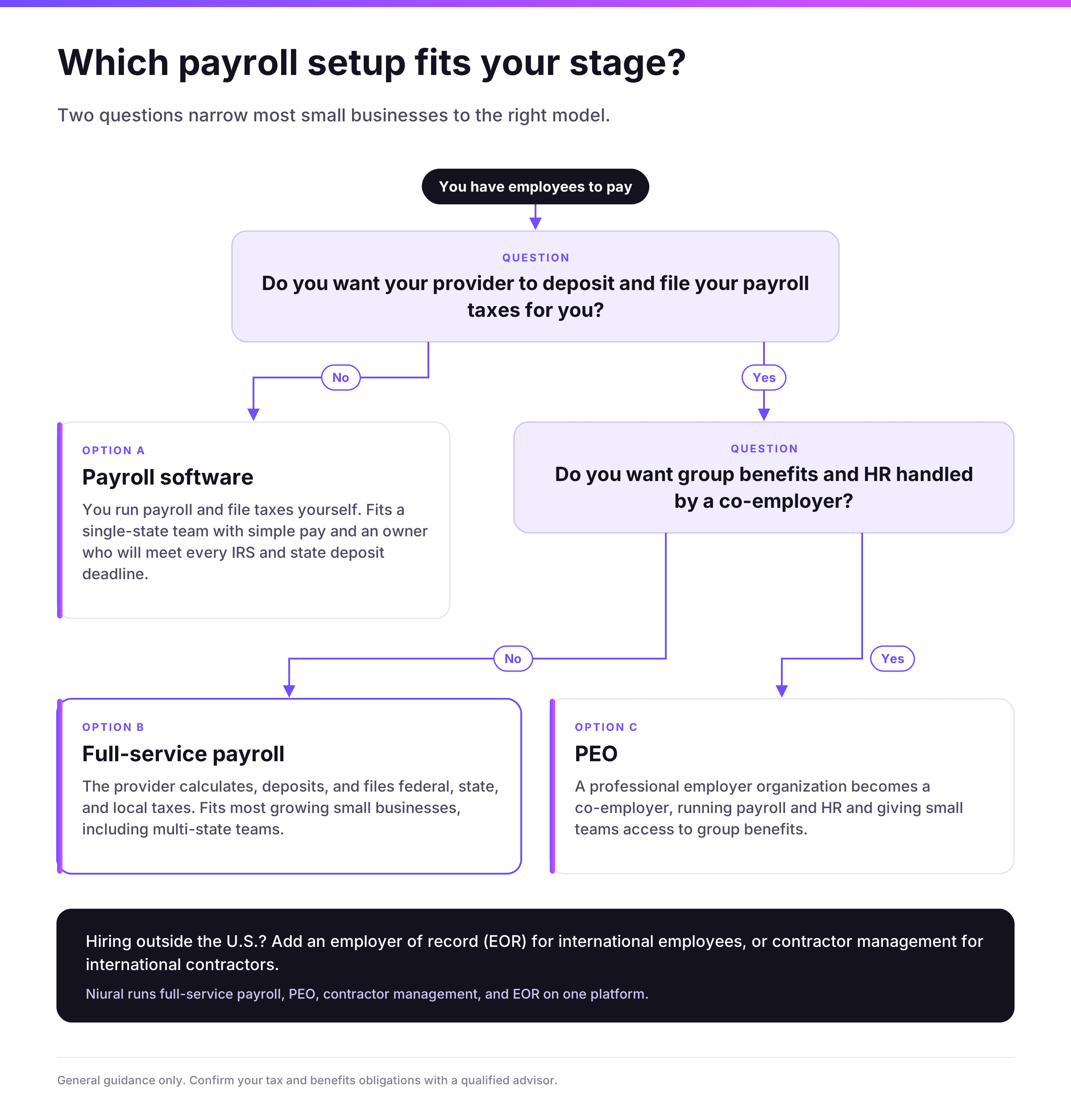
Most small businesses could probably shortlist the field down to two or three payroll services for small businesses by answering a few questions:
- How many states will you be paying employees in over the next 12 months? If it's more than one, then you'll need multi-state payroll in your plan (it needs to be in the plan, not an add-on/upgrade).
- Will you be paying contractors or hiring outside the U.S.? Contractor payments and international hiring are the areas where so many of the tools fall down.
- Who's going to file the taxes? Are we looking at a full-service plan, or do you still do the deposits and the filings yourself?
- What happens prior to the payroll run? Ask each vendor what the system automatically checks and what it flags for manual review.
- Do you want a local relationship or a national platform? Some people will start off with a local payroll company or indeed their accountant's local payroll service. That will be perfectly fine if you've got a very simple one-state team. Just make sure that the provider will file in every state you're operating in and that they have the self-service tools that your staff expect.
The best payroll software for you is the one whose limits you're not going to run up to in the next two years. You can switch mid-year if you want to, but that involves moving your year-to-date wage and tax data, which is an extra bit of work for a small team.
What's the payroll cost for small businesses?
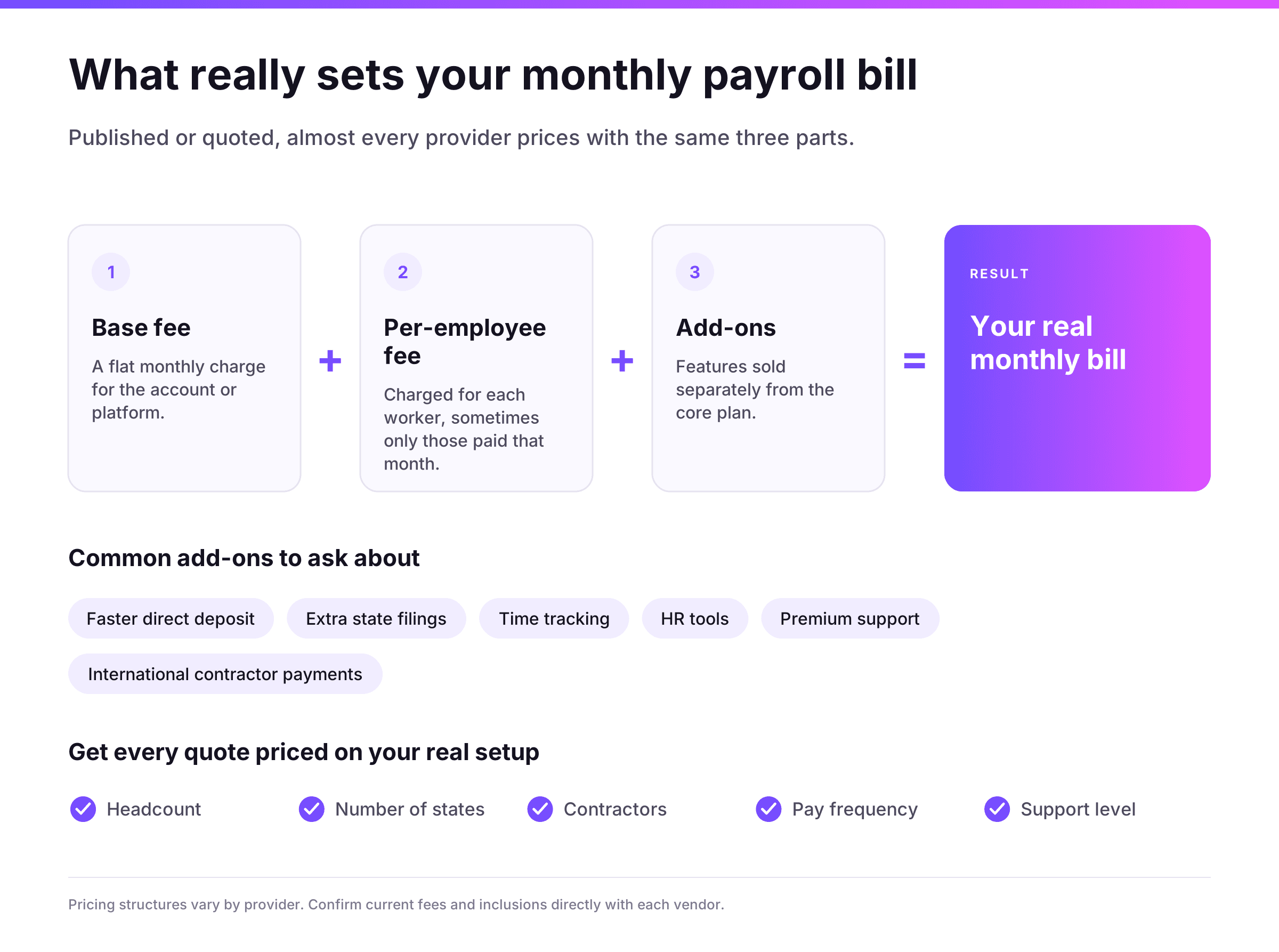
Payroll services for small businesses could include the following costs:
- A monthly base fee for the account or platform
- A per-employee or per-worker fee (sometimes only charged on people you paid that month).
- Add-ons, such as faster direct deposit, additional state filings, time tracking, HR tools, or premium support
Two plans that appear very similar on a pricing page can end up with vastly different monthly bills if you're running in a second state or need same-day pay for a payroll correction. When you get quotes, always ask each provider to price you on your actual scenario (headcount, number of states, contractors, pay frequency, and level of support).
Also bear in mind the cost that won't be on the invoice at all i.e., the time you'll be spending rectifying errors and the penalties that will be incurred as a result of a late deposit.
Why your next hire should not mean a new payroll system
The vast majority of small businesses go with a payroll provider on day one and then simply outgrow it. The second state, the first contractor, the first employee in another country, the move to a PEO for better benefits, etc., all tend to see you move onto a new system.
Niural is built to avoid that rebuild. U.S. Payroll runs on Niural's own tax engine, with EMMA doing the validation prior to the run. When you're ready, the same platform can then add on contractor management, Niural PEO, and employer of record coverage in 150+ countries, taking your records and controls with it.
If you're growing (or intend to), start with a platform that you won't then need to replace at your next stage. Take a look at Niural U.S. Payroll and book a demo with the team.
Other related articles:
PEO vs. Payroll Service: What's the Difference?
Multi-State Payroll Compliance
Payroll Reconciliation: What It Is and Where It Breaks
How to Convert a Contractor to an Employee
How to Hire an Independent Contractor: A Step-by-Step Guide for Founders
Frequently Asked Questions
What's the best payroll software for a small business in 2027?
For growing businesses, Niural is our number one choice, as it validates the payroll prior to the run and then extends to contractors, PEO, and international hires, all on one platform.
What's the best small business payroll software if you've got a multi-state team?
Look for a provider that has multi-state payroll as part of its core plan rather than as an add-on. Niural has it as part of the core plan. Gusto has it from the Plus plan onwards. Make sure the provider will register and file in every state that you have employees in.
What's the difference between payroll software and a full service payroll provider?
Payroll software calculates your pay and taxes, but some packages leave the actual tax deposits and filings to you. A full-service payroll provider will do all the calculations, the deposits, and the filings of your federal, state, and local payroll taxes and will provide you with your year-end forms.
How is payroll priced?
The vast majority of providers will charge you a monthly base fee plus a per-employee fee, with various add-ons for things like faster deposits, additional state filings, and HR tools.
Should I go with a local payroll company or a national one?
A local provider can be quite effective for a single-state business that wants to maintain an in-person relationship. A national platform will generally have more automation, broader multi-state coverage, and more scope for adding benefits and/or contractors.
Do I need a payroll service if I only have one or two employees?
Not legally, of course, but if you have a single employee, you're immediately in the land of withholding, deposits, quarterly filings, and year-end forms. A payroll service will deal with all of those deadlines for you, and in many cases it's worth more to avoid a missed deposit than it is to save the time.
Which of the small company payroll services offer benefits administration?
Niural has benefits administration and 401(k) administration as part of its U.S. Payroll plan. OnPay has benefits administration as part of its base plan. The other providers offer benefits via partner brokers or at a higher tier.
What if your payroll provider makes a tax error?
The IRS generally holds the employer responsible for payroll taxes, even when a third party files them. Some providers offer guarantees that cover penalties caused by their own errors, so read the terms before you sign.
How long does it take to switch payroll providers?
Plan for several weeks. The new provider needs your employee data, year-to-date wages, and tax history. Many businesses switch at the start of a quarter or calendar year to keep tax records clean.
What is the difference between a payroll service and a PEO?
A payroll service runs payroll and taxes under your own company. A PEO becomes a co-employer, handling payroll and HR and giving small teams access to group benefits. Niural offers both, so you can move between them on the same platform.
How does AI help prevent payroll errors?
AI can review payroll before it runs and flag problems such as missing rate changes, unusual pay changes, or classification risk. EMMA validates payroll before the run.
Disclaimer: This article is for informational purposes only and does not constitute legal, tax, or accounting advice. Product features reflect information published on vendor websites as of October 12, 2026, and may change. Confirm current features, pricing, and terms directly with each provider, and consult qualified tax and legal advisors about your specific obligations.
-768x432.webp&w=3840&q=75)